StarzMirror1.3.9.6
Publisher Description
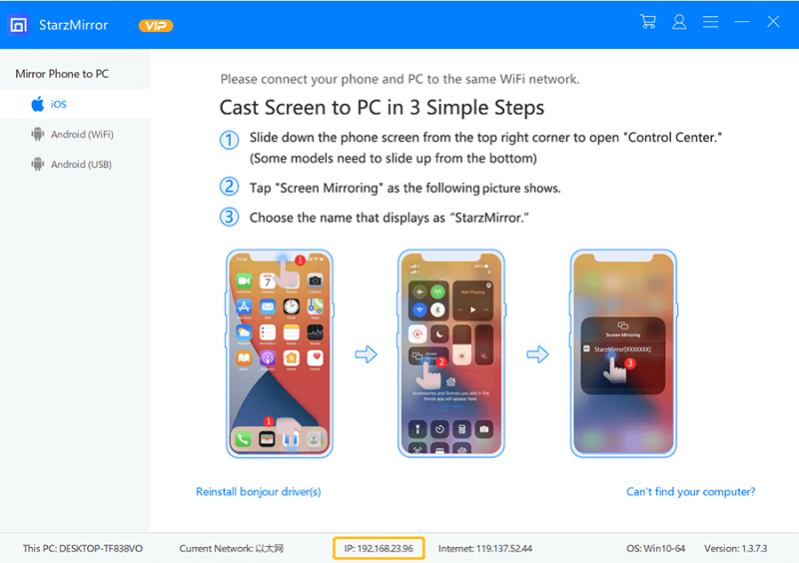
StarzSoft StarzMirror is here to help iPhone and Android users to mirror phone to PC easily and quickly.
There are three modes in this software, it supports mirroring iOS devices to PC with WiFi, mirroring Android devices to PC with WiFi and Mirror Android devices to PC with a USB cable.
What makes StarzMirror great is that you can record or screenshot your screen after mirroring with it.
Besides, if you used the USB mode to mirror your Android phone to PC, you can even use your keyboard and mouse to control it. And it is super convenient for game users as StarzMirror provides these features for you to customize on your screen:
Joystick: Control direction.
Key: Add other key positions to control.
Aim: Aim to shoot while playing games.
Fire: The shoot button.
To use StarzMirror, you just need to follow the steps below:
For iOS:
Connect your iOS device and StarzMirror to the same WiFi, then go to the control center and click on Screen Mirroring. From the pop-up window, select your StarzMirror.
For Android(WiFi):
Connect your Android and StarzMirror to the same WiFi, go to the mobile app on your Android, and click on the Mirror button on it. Then, scan the QR code on the desktop software and click Start now on your Android to complete the mirroring.
For Android(USB):
Follow the software instructions to enable developer mode and USB debugging. Connect your Android to the PC and select File Transfer.
Go to the desktop software, click on start to connect, and then click the mirror button to start mirroring.
With the help of StarzMirror, there is no difficulty in mirroring both iPhone and Android. And the most important is that you can mirror up to 6 different devices at the same time.
About StarzMirror
This Multimedia Creation Tools program is available in English. It was last updated on 29 September, 2026. StarzMirror is compatible with the following operating systems: Windows.
The company that develops StarzMirror is Starzsoft. All rights reserved.. The latest version released by its developer is 1.3.9.6.
The download we have available for StarzMirror has a file size of 1.0 MB. Just click the green Download button above to start the downloading process. The program is listed on our website since 2022-05-10 and was downloaded 135 times. We have already checked if the download link is safe, however for your own protection we recommend that you scan the downloaded software with your antivirus. Your antivirus may detect the StarzMirror as malware if the download link is broken.
How to install StarzMirror on your Windows device:
- Click on the Download button on our website. This will start the download from the website of the developer.
- Once the StarzMirror is downloaded click on it to start the setup process (assuming you are on a desktop computer).
- When the installation is finished you should be able to see and run the program.
Program Details
System requirements
Download information
Pricing
Version History
version 1.3.9.6
posted on 2022-05-10
All is new, mirror iPhone/Android to PC tool
